
Lock a Shipping Price
This FAQ will go over how to lock a shipping (freight) price. This feature allows you to lock a shipping/freight price on an order.
To do this, enter the desired Freight amount, and click the lock button beside the Freight field.
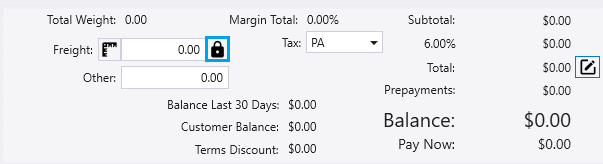
Clicking it will lock the freight amount so that it cannot be changed from anywhere in Paradigm or Dispatching unless it is unlocked. In order to unlock the Freight field, click on the lock button again.
Lock Freight At Zero
“Lock freight at zero” can be enabled on the Customer’s Detail tab.

When you create an order for a Customer that has this option selected, it will lock it to zero by default. Clicking the lock button again will unlock the freight.
