
Paradigm Portal Customer Search
This article covers the web customer search. The intended use case for this feature is for a phone system, CRM, or other software, to automatically open a URL reducing manual entry.
Search URL Parameters
Customers can be searched with Paradigm portal using a URL. The URL format looks like this: https://[ParadigmPortalURL]/search?phonenumber=[PHONENUMBER]&displayName=[DISPLAYNAME]&key=[SECURITYKEY]
There are three parameters to the URL that are separated with the & symbol. Each parameter is described below
- Paradigm Portal URL – This can be found in company preferences.
- Phone Number – The Phone Number that is being searched for.
- Display Name – The display name is what will automatically filled in if there are no results and a new customer is created.
- This parameter is optional.
- Security Key – The security key is used to authorize the request to search.
- This security key will be provided by Paragon Support.
Search Results
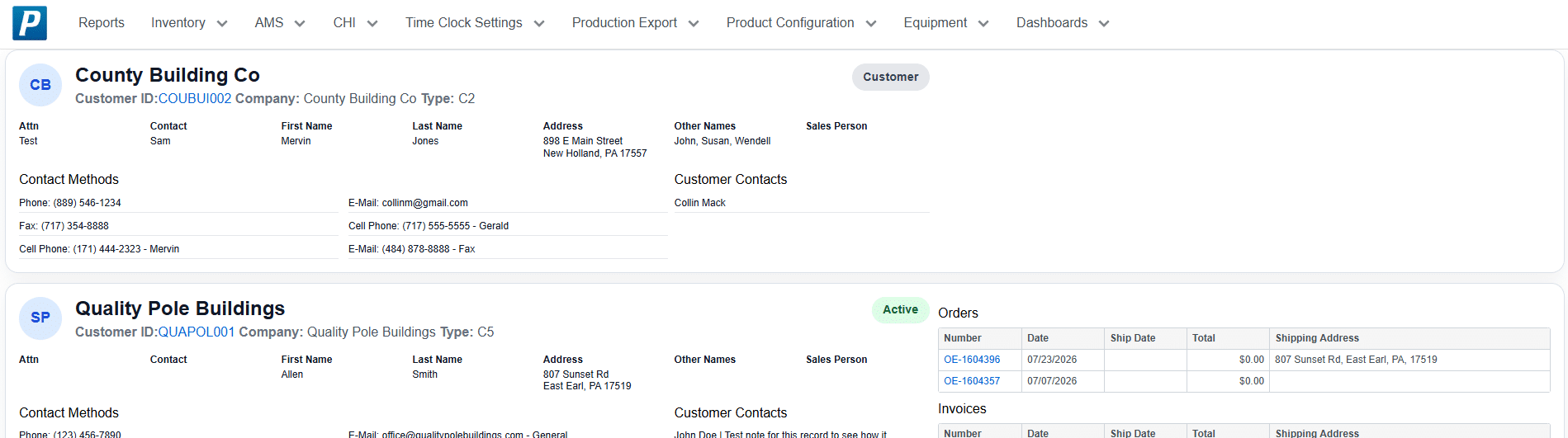
Search Results include contact information, customer details, and any orders, quotes, or invoices from the last 60 days. Clicking on the Customer ID will open that customer profile in Paradigm. Any record IDs can be selected to open them in Paradigm as well. Each customer result has a status at the top of their section. The statuses are defined below.
- Customer – The customer has no new records in the last 60 days.
- Quote Only – The customer has at least one quote but no other records in the last 60 days.
- Active – The customer has at least one sales order created in the last 60 days.
No results found
When there are no results for the search a Create Customer link is displayed. Selecting it will open paradigm with the phone number and display name already filled in on a new customer profile.
