Assign To Different Machine
This FAQ will go over how to assign builds and orders to a different machine in production.
Assign An Order To A Different Machine
Right clicking the order in any of the production screens will show an option called Assign to different machine. This will allow the user to select another machine to send the order to.

Assign A Build To A Different Machine
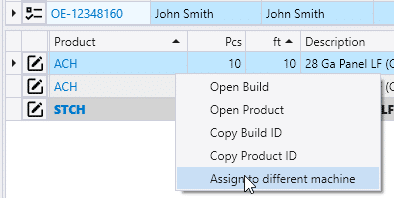
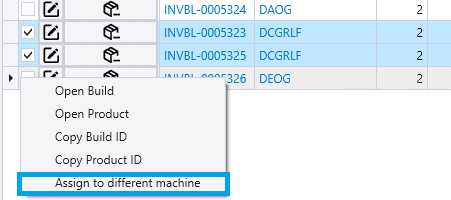
Right clicking the build in any of the production screens will show an option called “Assign to different machine”.
Assign to Machine Group
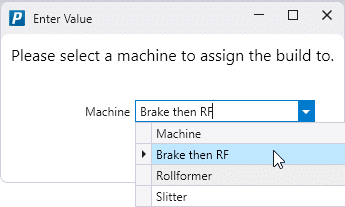
In addition to machines, the dialog will show any Machine Groups that have been set up. Selecting a machine group will cause the order or build to be assigned to all machines that are in the group in the order that they are arranged.
Reassigning Multiple Builds to a Different Machine
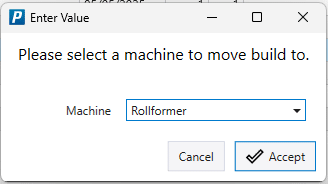
In the Work Orders List, Component Production, or Production Batching screens, multiple builds can be assigned to different machines. To do this check the box by the builds that need to be reassigned.
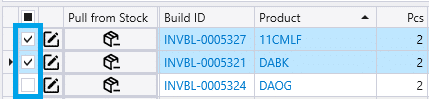
Right-clicking one of the selected builds will bring the option the “Assign to different machine”.
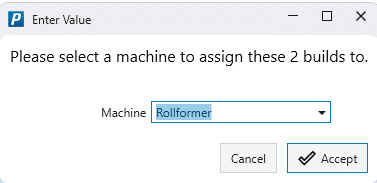
A prompt will be displayed to select which machine or machine group the builds should be reassigned to. When the correct machine is accepted, all the selected builds will be moved to the chosen machine or group.
Unable to Assign Builds to a Different Machine
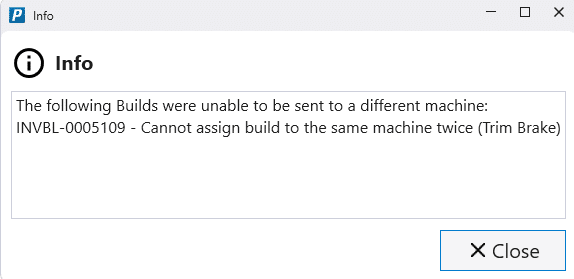
A build cannot be assigned to a different machine if that build is already assigned to that machine in a different step of its production. If that is attempted there will be a pop-up that says: The following Builds were unable to be sent to a different machine: [BUILD ID] – Cannot assign build to same machine twice ([MACHINE])