
Move Lot Stock Between Products
This FAQ covers how to move lot stock from one product to another using an inventory adjustment. This can be useful to correct lots assigned to the wrong item.
Inventory adjustment
- Go to
Inventory > Inventory Adjustment

- Input the products that need to be corrected. In the
Qty Diffcolumn, input a positive amount for the product that should have the inventory and a negative quantity for the product that needs inventory removed.- In the example below, the black coil had the inventory received that should be on the charcoal coil.

- When the adjusted quantities are correct, open the lot selection form by clicking the lot icon on the item.
- Select the lots, for the item which is receiving the product, a new or existing lot name can be filled in. For the item that is having product removed, the lot that the product is being removed from should be selected.
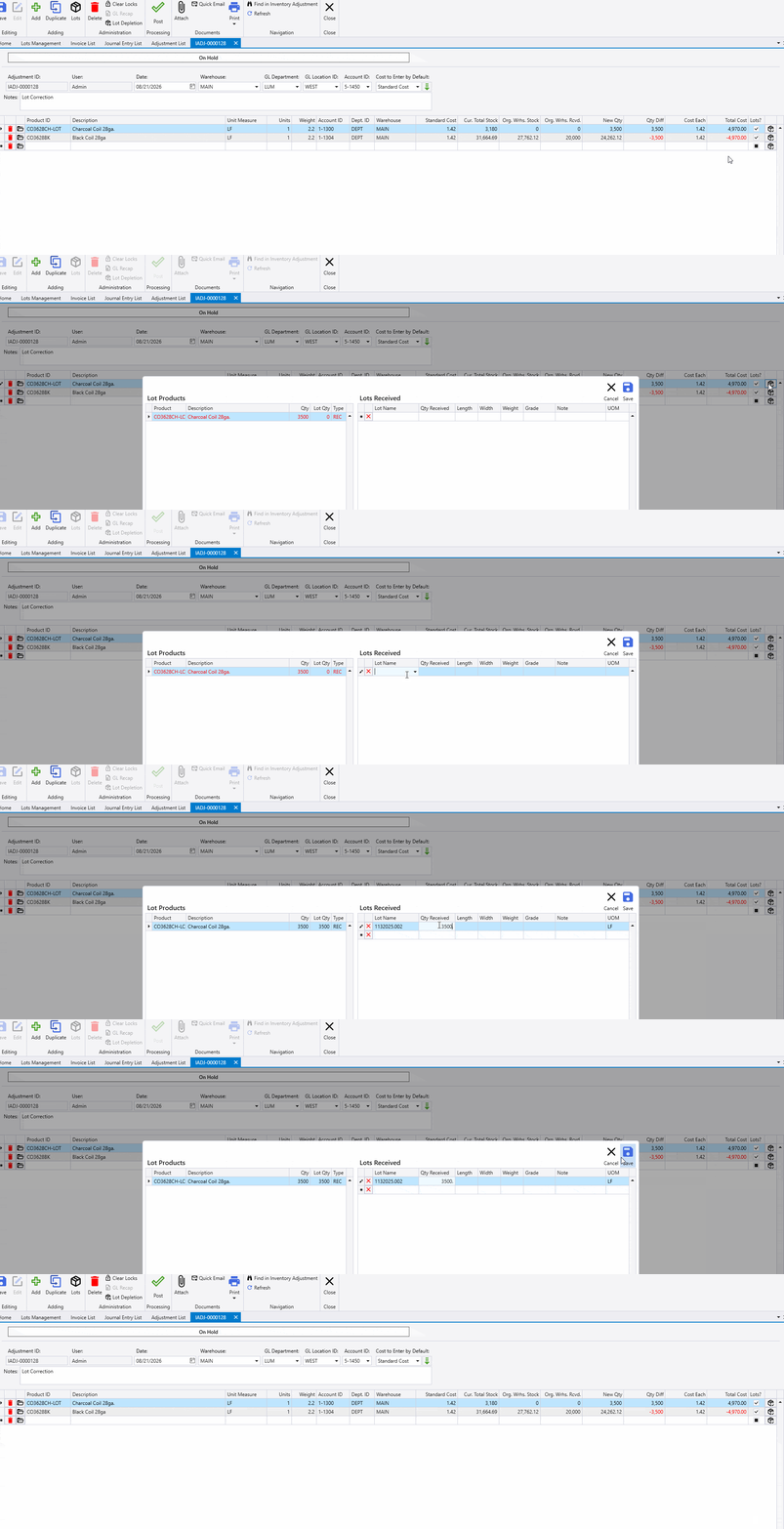
- Ensure the quantities and selected lots are correct.
- In most situations a full lot is being moved, so
End of Coil?should be selected. - In this scenario the lot name is kept the same.
- In most situations a full lot is being moved, so


- Select
Saveonce the lots are selected. - Double check the information and then the adjustment can posted.
