Favorited Transactions
This FAQ will go over how to set up and use favorited transactions, also known as memorized transactions. As of now the duplication cannot be scheduled and must be done manually.
The list of favorited transactions can be found by going to Banking > Favorited Transactions

Favoriting A Transaction
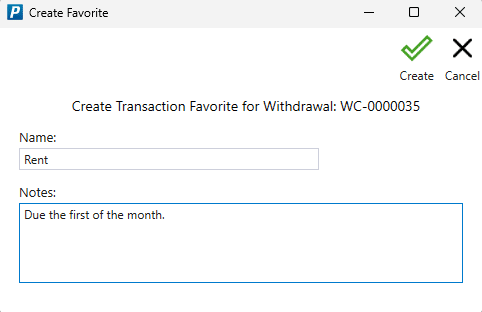
To favorite a transaction, click the “Favorite Transaction” button in the header. The transaction types that can be favorited are: Vouchers, CC Charges, Invoices, Journal Entries, and Withdrawals.

Name it and add any notes. Once it is created it will appear in the favorited transactions list.
Duplicating Favorited Transactions
To duplicate favorited transactions, first select the transaction date and whether or not to post it after it is created. The transaction date is the date that is set on the transactions that are created.
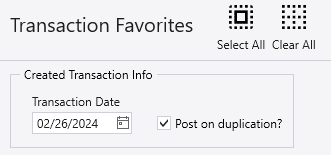
Then select the transactions to be duplicated and click “Duplicate”.

Miscellaneous Info
Columns
- Date Last Duplicated – The date the transaction was last duplicated on.
- Date on last duplication – The transaction date set on the last duplicated transaction.
- Last duplication ID – The ID of the last duplicated transaction.

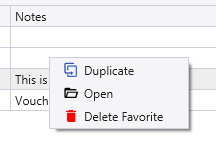
Right Click Options
- Duplicate – Duplicate the transaction.
- Open – Open the transaction.
- Delete Favorite – Remove the transaction from the favorites list.