Use Tax Setup
This FAQ will cover how use tax should be set up in Paradigm. Use tax is a state tax on the use, storage, or consumption on items which no sales tax has been paid. Use tax is to be applied to purchases made out of state, but then used within the state.
Creating Tax IDs
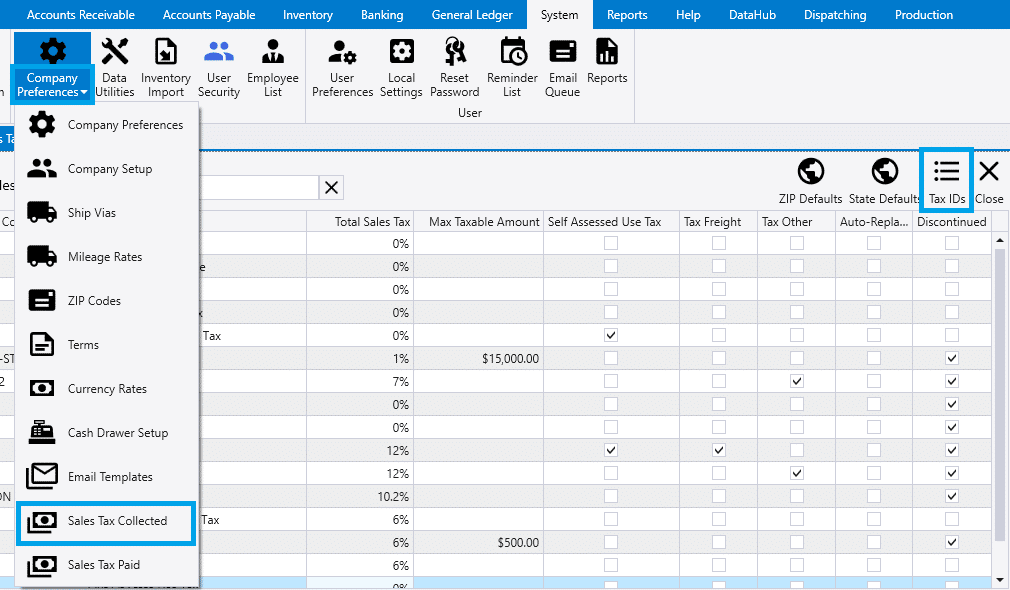
Go to the System Tab > Company Preferences Drop-down > Sales Tax Collected, then select Tax IDs.
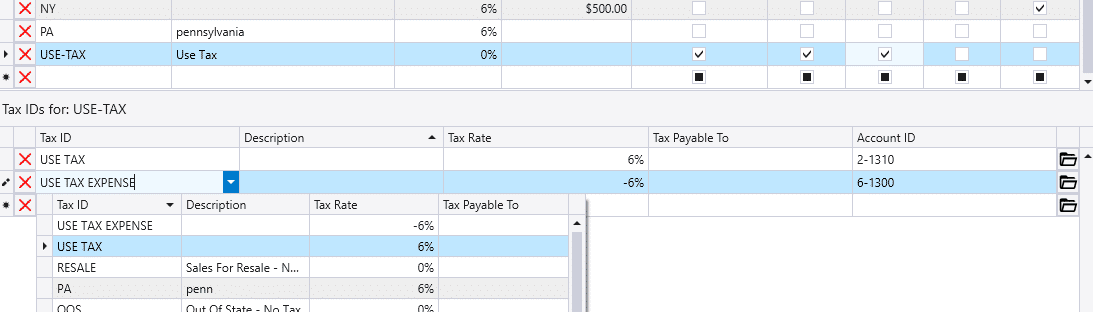
Then create the tax IDs. Each state should have 2 tax IDs. One whose account is a liability while the other as an expense.
- Liability tax ID should have a positive tax rate.
- Expense tax ID should have a negative tax rate.
Note:
When using the AvaTax integration, tax rates do not need to be set. AvaTax will handle tax rates once the report is uploaded.

Creating Tax Codes
Then add the Tax IDs created above to a new Tax Code. More instructions on configuring tax codes can be found here.